This guide will lead you through the steps to add a new Audio Input Source to your Blaze Audio 1008 Amplifier. The audio source in this specific guide is a Sonos Port.
Step 1: Connect the Input Source (Sonos Port) to the amplifier
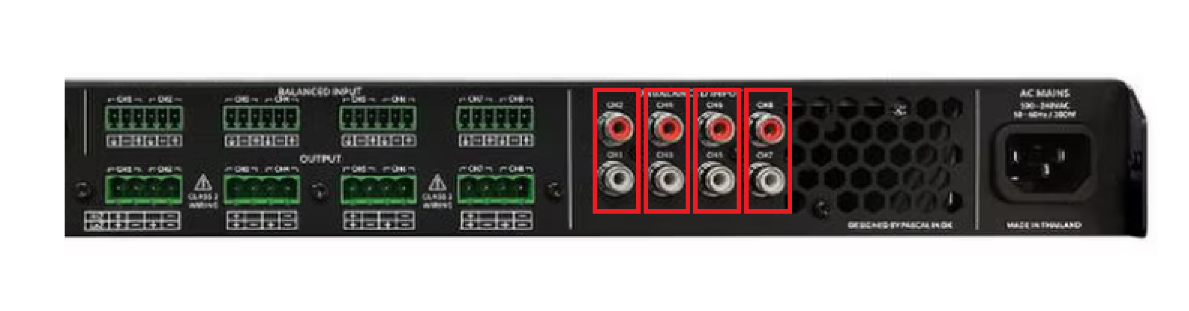
- Using the RCA cables, connect these to the 'Output' side of your audio source
- On the rear of the amplifier, connect the other end of the RCA cables to a spare input, ensuring to match the colours red to red, white to white
- The inputs are shown in red below, with the left-most being Analogue Input 1 and the right-most being Analogue Input 4
Step 2: Power on the Input Source (Sonos Port) and go through the onboarding steps
- A full guide on this from the manufacturer can be found here - https://support.sonos.com/en/article/set-up-your-sonos-port
Step 3: Test your Input Source (Sonos Port) by streaming music to a nominated Zone
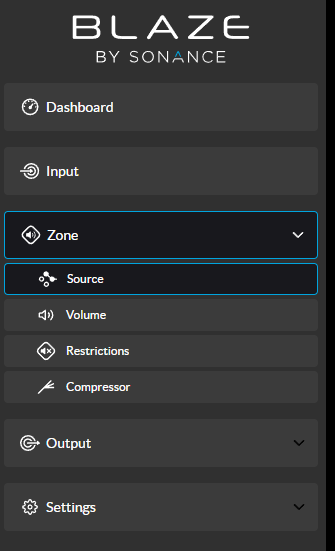
- On the amplifier User Interface, using the left-hand navigation menu, select 'Zone' then 'Source'
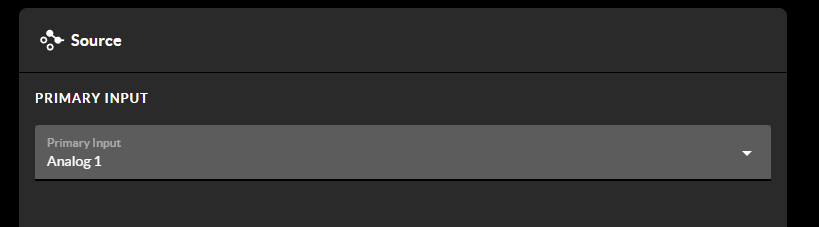
- Select the Zone you want to use to play music via your new Input and change the Primary Input to reflect the addition of the new Sonos Port
Was this article helpful?
That’s Great!
Thank you for your feedback
Sorry! We couldn't be helpful
Thank you for your feedback
Feedback sent
We appreciate your effort and will try to fix the article